Garage Door Motor FAQ's
Support and Answers for Your Garage Door Motor Needs
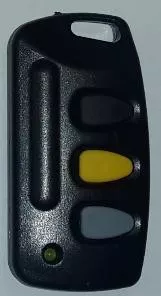
What remotes are compatible with my GEMINI motor?
On the new type battery backup operator with the red lever, only Gemini remotes (Code hopping) will work on the on-board receiver, unless an extra receiver is bought and connected separately then the remotes compatible with the extra receiver will also work.
For the older type Gemini Operators an external receiver is used. This is plugged in or wired to the PCB. The remotes you use will depend on the type of receiver connected to the PCB.
For example a sentry receiver would require a sentry remotes/transmitters.
How to program a garage door motor wall console / remote (tx).
- Wall Console Setup:
- Press and HOLD the OPEN/CLOSE button on the Wall Console.
- While holding it, press and release the FUNCTION button on the PCB of the Garage Door Operator (GDO).
- Once the FUNCTION button is pressed, you can release the Wall Console button.
- Gemini Remote (TX) Setup:
- Follow the same steps as above.
- Press and HOLD the desired button on the remote.
- While holding it, press and release the FUNCTION button on the PCB.
- Release the remote button after pressing the FUNCTION button.
The Wall Console or Gemini Remote is now programmed and ready for operation.
Replacing your 24 V Garage Door Motors batteries
- When removing your garage door motor batteries make sure that the main power source (220 V) is switched off or disconnected.
- Remove the red link and the black and red terminals found on the batteries.
- On the base of the motor you will find a small plastic clip holding the batteries in position. Press the clip downwards while pushing the nearest battery slightly out of its position over the clip until it is released and it can be taken out.
- “IMPORTANT” The batteries could have swollen up and will need more effort to be taken out.
- Once the first battery is removed you can move the second battery into the same position and follow the same steps in removing that battery.
- When both batteries are removed you can proceed in replacing them with the new batteries. Please keep in mind the correct position of the two batteries so that the black and red connectors of the harness can fit onto the correct terminals on the batteries.
- After the batteries are positioned accordingly the main power source can be switched on or reconnected and the “Charging” LED on the PC Board should be activated (Only on new models).
- For any further related enquiries please feel free to contact us during business hours for assistance.
- 012 742 3950 or Whatsapp on 072 429 4276
How to remove GEMINI Garage door motor batteries
How to remove your Extrusion on a Garage door motor
Need Assistance?
Office Hours
Mon – Fri, 7:30 – 16:45